 Nick Aguilar
I was adding a production MySQL node to our Percona Monitoring and Management (PMM) 3.9.0 server. The server sits behind an Nginx proxy that authenticates with a Grafana Service Account Token (glsa_...). Registering the node worked. The agent never managed to connect.
The log kept repeating one line:
Failed to establish two-way communication channel to Agents Service: rpc error: code = Canceled desc = context canceled.pmm-admin status showed Connected: false, with an empty Node ID and Node name.
context canceled doesn't say what was canceled or why. With gRPC involved, the first suspects are TLS, certificates and tokens, and I started with two of them: the token failing to authenticate, or Nginx routing the gRPC path wrong (/agent.v1.AgentService/Connect versus /agent.AgentService/Connect). Neither was the cause.
Testing the endpoint by hand with curl
First I wanted to know whether the endpoint answered to my token without pmm-agent in the way. gRPC runs over HTTP/2, so a curl POST reaches the application layer even though it can't speak the full protocol.
curl -i --http2 -X POST \
  -u "service_token:glsa_..." \
  -H "content-type: application/grpc" \
https://pmm.idbi.pe/agent.v1.AgentService/ConnectHTTP/2 200
grpc-status: 7
grpc-message: Empty Agent ID.The server complains that I sent no agent ID, which is expected from a hand-made call. To reach that validation, the request had already passed Nginx, found the right path and authenticated with Admin permissions. That ruled out the token and the proxy.
Checking whether the traffic arrives
Next, the Nginx access logs on the server. The REST registration calls (POST /v1/management/nodes) showed up with HTTP 200. The agent's gRPC connection never showed up at all. If the server never saw that connection, the failure happened before the first gRPC packet left the node.
Comparing with a healthy node
I had an identical node in Azure that worked, so I ran pmm-agent --trace on both and compared.
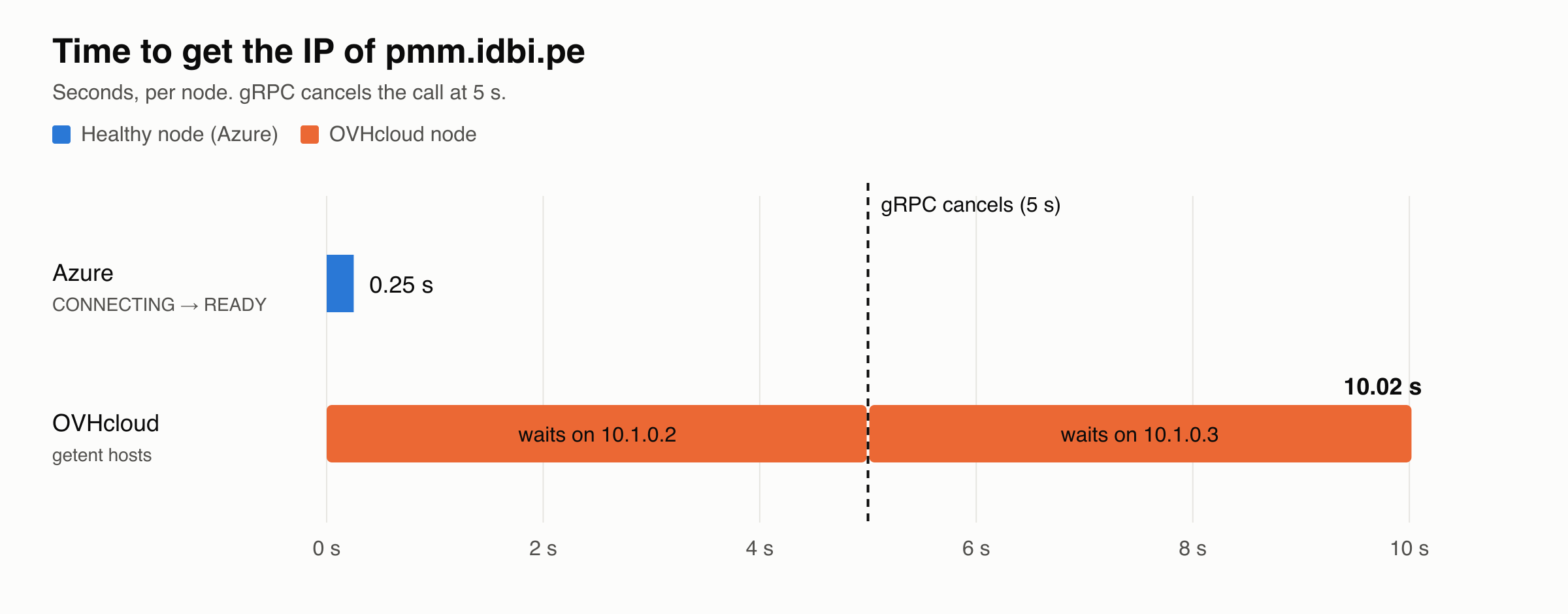
The Azure node went from CONNECTING to READY in about 250 ms, right after resolving the PMM server's IP. The OVHcloud node sat in CONNECTING for exactly 5 seconds, and then the context canceled fired.
A real network error rarely takes the same time on every attempt. A round, repeatable number is usually a timeout, so the useful question became what was eating those five seconds.
The root cause: a resolver that took 10 seconds
The healthy node connected right after resolving the IP, so I suspected name resolution. I measured it with libc, which is what the application uses:
time getent hosts pmm.idbi.peIt took 10.02 seconds.
grpc-go's connection timeout is 5 seconds. The system needed 10 to return an IP, so the call died waiting for the resolver, before it opened a single socket.
Why it took 10 seconds
The node runs on OVHcloud Public Cloud, which uses OpenStack and vRack. DHCP injects two local resolvers, 10.1.0.2 and 10.1.0.3, assigned to the ens3 interface with the domain openstacklocal. In resolvectl status, systemd-resolved marked ens3 with Default Route: yes, so it sent every public query to those internal OpenStack stubs.
Those resolvers drop AAAA (IPv6) queries for external names. libc asks for A and AAAA, waits 5 seconds for an answer from 10.1.0.2, retries for 5 seconds against 10.1.0.3, and finally falls back to IPv4. Those are the 10 seconds I measured.
It also explained why apt update failed at random when reaching the Ubuntu repositories.
Why /etc/hosts wasn't enough
My first attempt was to pin the IP of pmm.idbi.pe in /etc/hosts. It didn't fix it. With the entry only in IPv4, if the application asks for AF_UNSPEC, getent hosts still looks for the AAAA record over DNS, and that query is the one that hangs.
The fix: public DNS and Domains=~.
I configured systemd-resolved to use Cloudflare (1.1.1.1 and 1.0.0.1) as primary DNS and Google (8.8.8.8 and 8.8.4.4) as backup, in a drop-in:
# /etc/systemd/resolved.conf.d/00-custom-dns.conf
[Resolve]
DNS=1.1.1.1 1.0.0.1 8.8.8.8 8.8.4.4
Domains=~.
DNSOverTLS=opportunistic
DNSSEC=allow-downgrade
I put all four servers in DNS= instead of using FallbackDNS=. That directive only applies when no other DNS is configured, and here DHCP always supplies its own. In DNS= the order decides: Cloudflare first, Google if it fails.
The line that changes the behavior is Domains=~.. The ~ prefix marks a routing domain, not a search domain, and the . is the root, which matches every name. With that line, systemd-resolved sends any query to the servers in DNS=, even though ens3 is still marked as the default route. More specific domains, like openstacklocal, still resolve through the interface's resolver.
The other two directives aim for resilience without breaking anything:
DNSOverTLS=opportunistictries to encrypt the query with TLS and falls back to plain DNS if the server or the network doesn't allow it. Theyesmode would break resolution wherever port 853 is blocked. It protects against passive eavesdropping, not against an active attacker who forces a downgrade.DNSSEC=allow-downgradevalidates signatures when the server supports them and carries on without validating if it doesn't. Withyes, an upstream that handles DNSSEC badly would return SERVFAIL.
To apply and verify it:
sudo systemctl restart systemd-resolved
resolvectl status
resolvectl query pmm.idbi.pe
time getent hosts pmm.idbi.pe
resolvectl status should show the public DNS servers in the global block, and time getent hosts should no longer come close to gRPC's 5-second timeout.
Infrastructure as code with Ansible
This shouldn't be fixed by hand on a single machine. Every new node in OVH will receive the OpenStack resolvers again. A drop-in in resolved.conf.d survives reboots and DHCP renewals, because DHCP only touches the interface configuration. Here is the role:
# roles/resolved_dns/defaults/main.yml
resolved_dns_servers:
  - 1.1.1.1
  - 1.0.0.1
  - 8.8.8.8
  - 8.8.4.4
resolved_dns_domains: "~."
resolved_dns_over_tls: opportunistic
resolved_dnssec: allow-downgrade
resolved_dns_check_host: pmm.idbi.pe{# roles/resolved_dns/templates/00-custom-dns.conf.j2 #}
# Managed by Ansible
[Resolve]
DNS={{ resolved_dns_servers | join(' ') }}
Domains={{ resolved_dns_domains }}
DNSOverTLS={{ resolved_dns_over_tls }}
DNSSEC={{ resolved_dnssec }}# roles/resolved_dns/tasks/main.yml
- name: Create the systemd-resolved drop-in directory
ansible.builtin.file:
path: /etc/systemd/resolved.conf.d
state: directory
owner: root
group: root
mode: "0755"
- name: Install the DNS drop-in
ansible.builtin.template:
src: 00-custom-dns.conf.j2
dest: /etc/systemd/resolved.conf.d/00-custom-dns.conf
owner: root
group: root
mode: "0644"
notify: Restart systemd-resolved
- name: Ensure systemd-resolved is enabled and running
ansible.builtin.systemd_service:
name: systemd-resolved
enabled: true
state: started
- name: Apply the changes before verifying
ansible.builtin.meta: flush_handlers
- name: Verify that libc resolution answers in under 3 seconds
ansible.builtin.command: "timeout 3 getent hosts {{ resolved_dns_check_host }}"
changed_when: false# roles/resolved_dns/handlers/main.yml
- name: Restart systemd-resolved
ansible.builtin.systemd_service:
name: systemd-resolved
state: restartedThe template and the handler make the task idempotent: if the file already has that content, Ansible touches neither it nor the service. The last task fails if getent takes more than 3 seconds, so a node with the problem shows up in the playbook itself and not weeks later as an agent that won't connect.
What I'm taking away
- An exact, repeatable number in a failure is almost always a timeout. Before touching tokens or certificates, look for what is spending that time.
- Running the same command, with
--trace, on a healthy node and a sick one tells you more than any hypothesis. The difference between the two is the diagnosis. - When a client hangs while connecting, measure name resolution separately with
time getent hosts. Usegetentand notdig, becausedigdoesn't go through the same resolution path as your applications. - In a private cloud, DHCP decides your DNS. Check
resolvectl statuson new images and pin the DNS in code, so the next node doesn't repeat the problem.